iCAUR V23 ADAS Guide – All Features, How to Use, Turn Off
A detailed look at the iCAUR V23’s ADAS features, available settings, and how drivers can manage them.


Chery’s sub-brand iCAUR has officially launched its compact, fully electric SUV in Pakistan, which brings a bold, retro-rugged design to Pakistan’s growing EV market. Despite its minimalist interior and position as iCAUR’s entry-level model, the V23 comes equipped with a Level 2 ADAS suite. iCAUR V23 is offered in two variants, RWD and AWD, and both trims offer the same level of ADAS suite. Both trims are offered as CBU units. This ADAS Guide lists all features available in the iCAUR V23 and how you can turn them on or off.
This ADAS Guide for the iCAUR V23 will focus on different ADAS features present in the vehicle and how you can manage them. If you want to understand what ADAS is, and how different features operate on vehicles, you can check out our dedicated ADAS Guide. This guide thoroughly explains every ADAS feature, different ADAS Levels, and how they differ from each other.


iCAUR V23 ADAS Features at a Glance:
| ADAS Feature | V23 RWD | V23 AWD |
| Adaptive Cruise Control (ACC) | ✓ | ✓ |
| Traffic Jam Assist (TJA) | ✓ | ✓ |
| Autonomous Emergency Braking (AEB) | ✓ | ✓ |
| Forward Collision Warning (FCW) | ✓ | ✓ |
| Lane Departure Warning (LDW/LDWS) | ✓ | ✓ |
| Lane Keeping Assist (LKA/LKAS) | X | X |
| Lane Departure Prevention (LDP) | ✓ | ✓ |
| Blind Spot Detection (BSD) | ✓ | ✓ |
| Lane Change Warning (LCW) | ✓ | ✓ |
| Rear Collision Warning (RCW) | ✓ | ✓ |
| Rear Cross Traffic Alert (RCTA) | ✓ | ✓ |
| Rear Cross Traffic Brake (RCTB) | ✓ | ✓ |
| Door Open Warning (DOW) | ✓ | ✓ |
| Driver Attention Warning / Indicator (DAW/DAI) | ✓ | ✓ |
| Driver Condition Monitoring | ✓ | ✓ |
| Intelligent Speed Assist | ✓ | ✓ |
| Road Sign Assist / Traffic Sign Recognition | ✓ | ✓ |
| Rear Pre-Collision Monitor | ✓ | ✓ |
| Moving Object Detection | X | X |
Note: iCAUR’s terminology distinguishes Lane Keeping Assist (LKA) from Lane Departure Prevention (LDP). The V23 provides lane-correction functionality through its Lane Departure Warning Assist system, with the “Warning + Lane Correction” setting providing steering intervention.
All Customizable ADAS Features in iCAUR V23
The following features can be customized through V23’s ADAS settings. Features without user-adjustable settings are not covered individually, as their operation is managed automatically by the vehicle.
Intelligent Cruise Assist (ICA) and Traffic Jam Assist:
The iCAUR V23 comes equipped with Intelligent Cruise Assist (ICA) and Traffic Jam Assist. While both features are fairly equal, their main difference is their operating speeds. Intelligent Cruise Assist is aimed at high-speed driving, while Traffic Jam Assist operates in congested, slow-speed traffic jams. Both features operate as two halves of the same system, automatically switching back and forth depending on the traffic conditions.
Core Difference:
| Feature | Traffic Jam Assist (TJA) | Intelligent Cruise Assist (ICA) |
| Speed Range | Low Speeds between 0-60 Km/h | High Speeds (typically above 60 km/h) |
| Primary Environment | Heavy bumper-to-bumper city traffic | Open highways and motorways |
| Tracking Method | Follows the traffic directly ahead if lane markings are blurry or missing | Strictly follows painted lane markings on the road |
| Stop & Go Behavior | Automatically brakes to a full stop and resumes when traffic moves | Designed for continuous cruising; will deactivate if speed drops drastically |
On the iCaur V23, you do not have to choose between them manually. Pulling the right-side steering column stick down twice engages the cruise system, and the car will dynamically switch between TJA and ICA on its own based on your current speed.
If the car ahead stops and then moves again within 3 seconds, the iCAUR V23 will automatically release the brakes and resume creeping forward. You do not have to touch anything as the system itself handles the stop-and-go sequence. However, if the stop is over 3 seconds, the V23 will enter a Standby/Hold state for safety reasons.
This is a safety feature to prevent the car from launching unexpectedly forward in case the driver is distracted. To re-engage TJA, you will need to either gently tap the accelerator pedal once or click the right-side steering wheel scroll knob.
Lane Control:
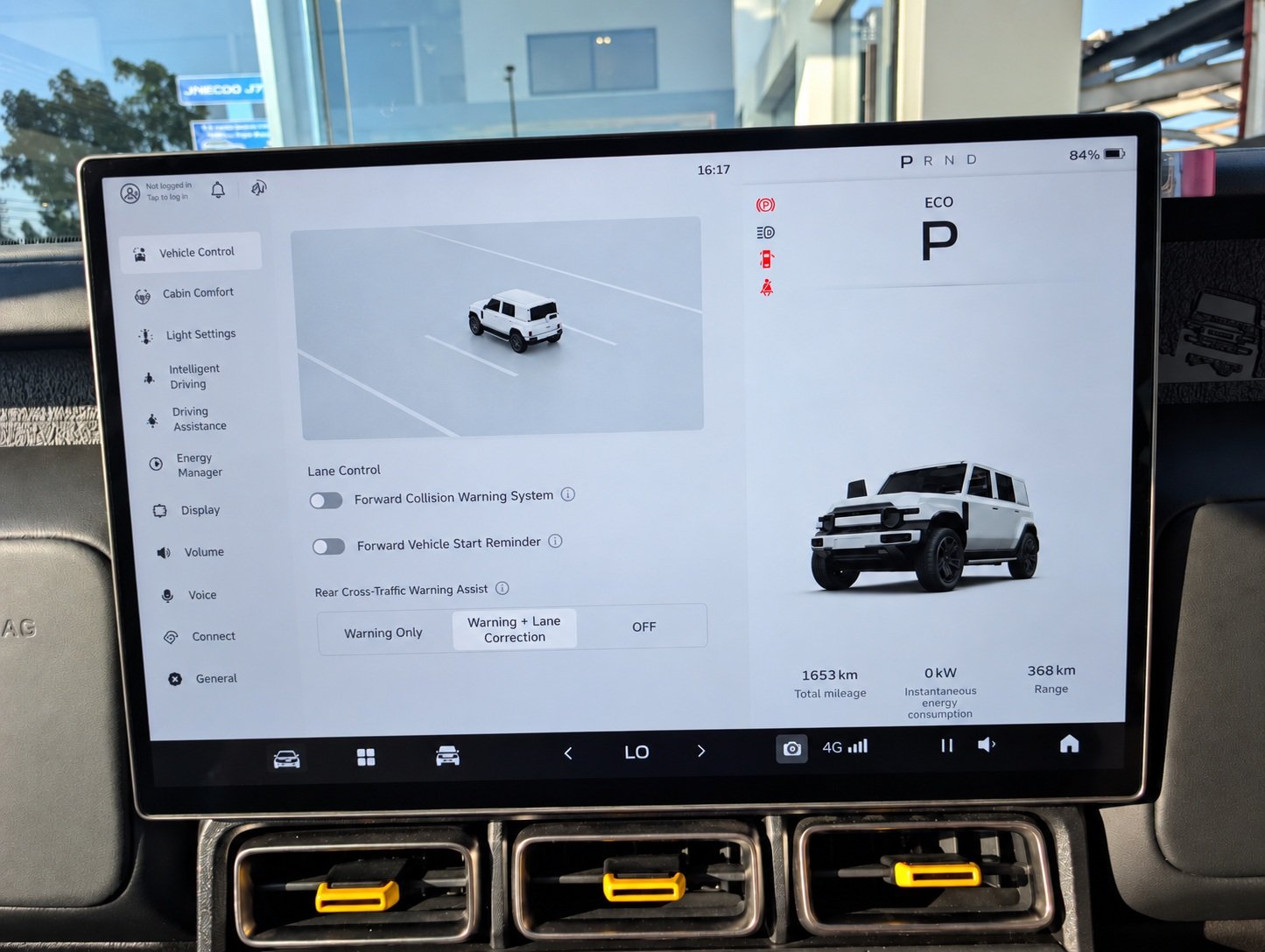
In the Lane Control section, you can choose from two settings:
- Forward Collision Warning Assist: Turning this setting on will ensure that Autonomous Braking Assist is functional, and it will not only brake but also give you a sound warning. If you do not want these features, you can simply tap on its icon and turn it off.
- Forward Vehicle Start Reminder: Turning this setting on will play a sound when it detects that a vehicle at your front has moved away. If you do not want this feature, simply tap on it, and your iCAUR V23 will no longer play a sound.
Lane Departure Warning Assist:
The final adjustable setting in the ADAS menu is the Lane Departure Warning Assist, which has three settings that you can choose from. These include:
- Warning Only: With this option, your iCAUR V23 will only play a sound warning if it senses your vehicle is leaving its current lane.
- Warning + Lane Correction: This is the full automation setting, and when this is selected, the iCAUR V23 will not only play a warning sound but also correct itself with steering input to ensure that the vehicle remains inside the lane. It will also vibrate the steering wheel as a warning to alert the driver beforehand.
- Off: This selection will turn off both the sound warning as well as the automatic steering input for lane correction.
How to Access ADAS Features in the iCAUR V23:
Surprisingly, the V23 gives very little freedom on what you can turn on and turn off when it comes to ADAS features. However, the ADAS menu can be accessed through its main screen in the middle of the dashboard. If you look at the screen, there are three icons on its lower left side, located on the right side of the volume information icon. To access the ADAS, you must tap on the front-facing vehicle icon, which is the rightmost icon, and it opens up the Settings menu on the screen. Once it opens, you must tap the Intelligent Driving Assist button on the left sidebar, which takes you to the ADAS suite list for management.
Our Recommended ADAS Settings for Using the V23 in Pakistan:
The V23 gives very little freedom when it comes to how you can manage ADAS features, but our suggestions are as follows, based on what can be managed.
| ADAS Feature | Our Suggestion |
| Adaptive Cruise Control (ACC) | This can be set based on your current driving scenario |
| Traffic Jam Assist (TJA) | Keep it on and adjust according to driving conditions |
| Autonomous Emergency Braking (AEB) | Keep it off in city traffic, but it can be helpful on highways |
| Forward Collision Warning (FCW) | Keep it on. |
| Lane Departure Warning (LDW/LDWS) | Keep it on: Warning + Lane Correction |
| Lane Departure Prevention (LDP) | Keep it on |
| Blind Spot Detection (BSD) | No dedicated on/off setting |
| Lane Change Warning (LCW) | Keep it on |
| Rear Collision Warning (RCW) | No dedicated on/off setting |
| Rear Cross Traffic Alert (RCTA) | No dedicated on/off setting |
| Rear Cross Traffic Brake (RCTB) | No dedicated on/off setting |
| Door Open Warning (DOW) | No dedicated on/off setting |
| Driver Attention Warning / Indicator (DAW/DAI) | No dedicated on/off setting |
| Driver Condition Monitoring | No dedicated on/off setting |
| Intelligent Speed Assist | No dedicated on/off setting |
| Rear Pre-Collision Monitor | No dedicated on/off setting |
| Moving Object Detection | No dedicated on/off setting |
The iCAUR V23 brings a comprehensive Level 2 ADAS suite to both its RWD and AWD variants, with features covering forward collision protection, lane assistance, adaptive cruise control, blind-spot monitoring, and rear-driving assistance. While the vehicle provides limited control over which systems can be disabled, understanding how each available setting works can help drivers configure the systems according to their needs. As with any ADAS-equipped vehicle, these technologies are designed to assist the driver rather than replace their attention and control, making it important to remain engaged with the road and surrounding traffic at all times.
Additional ADAS guides are linked below:
- MG Cyberster ADAS Guide – All Features, How to Use & Turn Off
- Toyota Raize / Daihatsu Rocky (First Generation) ADAS Guide – All Features Across All Trim Levels, How to Use, Turn Off
- Toyota Yaris (Facelift) Active Safety Features Guide – All Features Across All Six Variants
- Deepal S05 ADAS Guide: All Features, How to Use Them, and How to Turn Them Off