MG Cyberster ADAS Guide – All Features, How to Use & Turn Off
A complete guide to the MG Cyberster’s ADAS features, available settings, and how to manage them across its Pakistani variants.

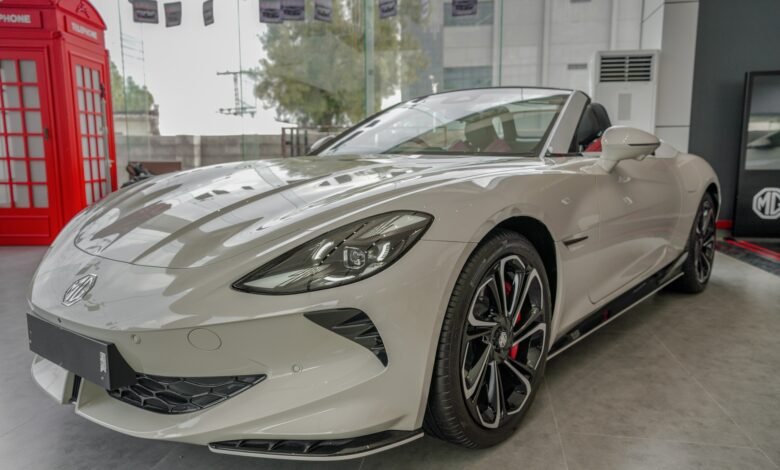
MG Cyberster is MG’s premium, low-volume ‘halo’ sports car, and it is offered in two different variants in Pakistan. It comes in a single-motor RWD setup along with the flagship Dual Motor AWD setup. While there is also a third trim called Couture Edition, it never made its way to Pakistan because it is offered in select markets only and is a limited, aesthetic package. Despite the trim, all MG Cyberster variants share the same ADAS features. This ADAS guide lists all features available in the MG Cyberster and how to turn them on or off.
MG Cyberster comes with a standard Level 2 ADAS suite across both trims offered in Pakistan. Since MG is marketing it as a premium vehicle, even the entry-level MG Cyberster GT Trophy comes with a full set of ADAS features. In this guide, we will only detail which ADAS features are present in the MG Cyberster, and how you can manage them. We have a separate dedicated guide that details what every ADAS feature does and how it works. You can learn about different ADAS levels and their included features through the guide.

MG Cyberster ADAS Features at a Glance:
| ADAS Feature | Trophy (Single-Motor RWD) |
GT (Dual-Motor AWD) |
| Adaptive Cruise Control (ACC) with Stop & Go | Standard | Standard |
| Active Emergency Braking (AEB) | Standard | Standard |
| Forward Collision Warning (FCW) | Standard | Standard |
| Lane Keep Assist (LKA) & Departure Warning | Standard | Standard |
| Emergency Lane Keeping (ELK) | Standard | Standard |
| Blind Spot Detection (BSD) | Standard | Standard |
| Rear Cross Traffic Alert (RCTA) | Standard | Standard |
| Traffic Jam Assist (TJA) | Standard | Standard |
| Intelligent Speed Limit Assist | Standard | Standard |
| 360-Degree Surround View Camera | Standard | Standard |
| Front & Rear Parking Sensors | Standard | Standard |
| Scissor Door Collision Avoidance Sensors | Standard | Standard |
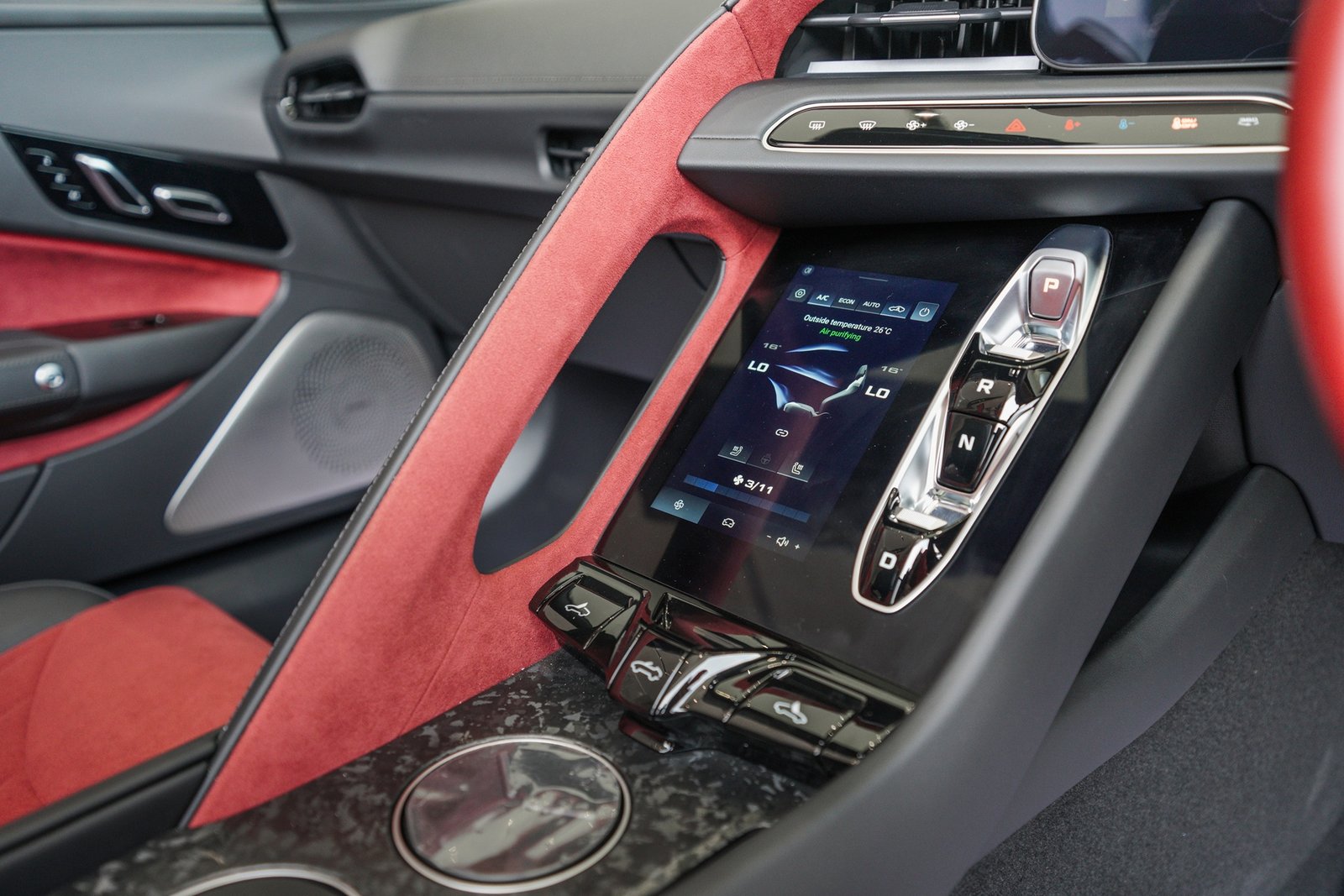
All ADAS Features in MG Cyberster
The MG Cyberster ADAS Features are divided into three categories
- Intelligent Drive
- Driving Assist
- Safety
Intelligent Drive:
The Intelligent Drive offers three different settings and an option to turn it off.
These settings include:
- LIM
- ACC
- ICA
- OFF
LIM (Speed Limit Assist):
This comes in two further modes:
- Manual Mode: When the manual mode is active, the MG Cyberster will actively keep the speed below the current vehicle speed. You can adjust the speed limit value from the ‘+’ and ‘-‘ buttons on the left steering wheel joystick.
- Intelligent Mode: In Intelligent Mode, the MG Cyberster will actively keep the speed below the detected speed level. Speed cannot be manually adjusted in this mode.
ACC (Adaptive Cruise Control):
When this is active, Cruise Control will ensure that the MG Cyberster actively manages the speed of the vehicle while driving. If the vehicle driving ahead slows down, the MG Cyberster will also slow down, even if it comes to a stop. When the vehicle ahead starts moving, it will start gaining speed and will try to reach the set speed limit if possible. While this is active, if the vehicle wants driver feedback, it will display a message on the center screen.
ICA (Intelligent Cruise Assist):
ICA works alongside ACC to provide steering assistance and help keep the vehicle within its lane. It is a driver-assistance system rather than autonomous driving, and the driver must remain attentive and ready to take control. MG Cyberster will ask the driver to keep both hands on the wheel when this is active and will ask the driver when it wants to release control to him.
Driving Assist:
The Driving Assist category allows you to change the settings of three features:
- Intelligent Overspeed Alert
- Overspeed Audible Warning
- Speed Limit Change Tone
Intelligent Overspeed Alert:
MG Cyberster has three ways of helping the driver in regard to maintaining speed limits on the roads. The first one is Intelligent Overspeed Alert. This system scans the roadside speed signs and displays them as a standard circle inside the instrument cluster display. If you cross this road, the speed limit graphic on the screen will start to flash brightly, trying to catch your attention. If Cruise Control is active, then this system will automatically adjust the speed limit if it changes.
Overspeed Audible Warning:
This setting allows you to turn on or off an audible warning chime or beeping noise for crossing the speed limit. When this is on, the MG Cyberster will not only flash the icon on the screen but also play a continuous electronic chime to get your attention.
Speed Limit Change Tone:
This is another audible tone that only plays when the speed limit on the road changes. Its purpose is not to notify you whether you are overspeed; rather, its purpose is only to notify you when the speed limit changes on the road you are currently driving on. When this setting is on, the MG Cyberster will play an additional tone to inform you that the speed limit has changed. If cruise control is on, it will also automatically slow down or increase speed.
All three settings in the Driving Assist are always turned on by default every time the MG Cyberster starts. If you want to turn them off, you must manually turn them off every time you get into the car and start it.
Safety:
You can manage four different features in the Safety tab:
- Forward Collision Warning
- Lane Departure Assist
- Rear Drive Assist
- Driver Fatigue Monitor
Forward Collision Warning:
MG Cyberster offers multiple options in the Forward Collision Warning. Tapping on the detailed settings will allow you to change the Assist Mode and the System Sensitivity.
Assist Mode:
You can select one from two options:
- Alert Only: This limits the warning to only visual flashes on the display screen along with a loud sound that will warn you to apply the brakes because it is detecting a front collision. Using this setting disables the Automatic Emergency Braking (AEB).
- Alerts & Brake: This activates the full system, and if the driver fails to brake in time, the system will take over and apply the brakes while giving both visual and audio warnings.
System Sensitivity:
You can select one from three options:
- High (Far): The system scans far down the road and triggers alerts early. This works best on highways and motorways, where the vehicle speed is high and requires more time to slow down.
- Normal (Medium): The default setting. This is ideal for normal city driving on normal roads.
- Low (Near): The system will wait and alert or brake only when it is much closer to the obstacle.
Lane Departure Assist:
There are multiple settings by which you can change how your MG Cyberster manages the Lane Departure Assist, including Lane Assist Mode, Alert Sensitivity, Audible Warning Toggle, and Vibration Reminder.
Lane Assist Mode:
You can select one from three options:
- Alert Only: MG Cyberster will only warn you by playing a sound and flashing on the main screen.
- Departure Assist (LKA): The MG Cyberster will first give a warning, and if you continue to move into the other lane, the electric steering rack applies a gentle nudge to guide the car back into the lane.
- Lane Keeping (Centering): This is the most active mode out of the three, and it will not wait for you to respond. The vehicle will automatically read the lane lines and continue to apply constant, minute steering adjustments to ensure that the vehicle is continuously in the dead center of the lane.
Alert Sensitivity:
You can select one of two options:
- High: The system will activate immediately as soon as your tires get anywhere near the inside edge of a lane line.
- Low: The system will wait until the tire is actually close to the lane, or about to go over, before kicking in.
Vibration Reminder:
Due to its sports car nature, MG Cyberster also comes with a physical feedback mechanism. When this is turned on and your tires go over the line, the steering wheel will simulate the sensation of hitting a highway rumble strip directly through the steering wheel.
Audible Warning Toggle:
This comes with a simple On and Off toggle, and it allows you to turn on or off a sound notification that plays when you are about to cross over into the other lane. Turning this off will still keep the other options on.
Rear Driving Assist:
Inside the Rear Driving Assist section, pressing Detailed Settings will allow you to manage multiple additional features like Blind Spot Detection, Lane Change Assist, Rear Cross Traffic Assist (RCTA) & Braking, Door Open Warning (DOW), and Rear Collision Warning (RCW).
Blind Spot Detection (BSD):
Here you can either turn it off or on. If on, the MG Cyberster’s radars will scan your rear blind spots, and if it detects something, a triangle warning light will illuminate on the corresponding side mirror.
Lane Change Assist:
This selection is also an On and Off toggle. When turned on, this works alongside the MG Cyberster’s BSD and controls when you can turn into another lane safely. When it is on, and you flick your turn signal to switch lanes, and the system detects a fast-approaching vehicle behind, it automatically overrides the mirror light and triggers a rapidly flashing visual warning accompanied by an audible sound.
Rear Cross Traffic Assist (RCTA) & Braking
Since the Cyberster is a low-sitting vehicle, it might not be easily visible in parking lots, especially to drivers in pickups and 4x4s. In such scenarios, the RCTA will assist you in carefully reversing your vehicle without anyone else hitting you. Here, you can choose from two settings:
- Warning Only: With this setting, the Cyberster will only give you a beep and show directional arrows on your 36-degree camera.
- Warning & Braking: With this setting, the Cyberster will not only beep and show arrows, but also brake quickly if you keep accelerating after the initial warnings.
Door Open Warning (DOW):
This is a special ADAS feature for the MG Cyberster because it caters to its electric upward-swinging scissor doors. This toggle allows you to turn it on or off. When it is on and your passenger tries to open the door, the MG Cyberster’s rear sensors will remain active and scan for incoming bikes, vehicles, or other hazards. If it detects something, it will give a beep, show a warning on the screen, and stop the motorized door opening sequence to prevent an accident.
Rear Collision Warning (RCW):
This is yet another simple toggle for turning the RCW on and off. When it is turned on, the vehicle will actively detect incoming vehicles when the MG Cyberster is parked. Upon detection, it will start flashing the hazard lights at a high frequency to alert the distracted driver and prepare the internal pre-tensioning seatbelts.
Driver Fatigue Monitoring System:
Apart from turning the system on and off, you can tap on Detailed Settings; it will give you additional options to tailor the system to your own liking. It offers options including Monitoring Sensitivity, Alarm Volume, and Alert. Every time you start the car, this feature is always on.
Monitoring Sensitivity:
Here, you can choose one from three settings:
- High: With the high setting, the system works in a strict oversight mode. For example, if you look down at the climate controls and look out at the side window for more than two seconds, it will push a warning flash to the digital cluster.
- Normal: This is the default setting, and it is much more relaxed than High. With Normal, the MG Cyberster allows for normal driving behavior. Activities like checking side mirrors, using the center NAV screen or any other activity do not trigger an alarm unless your eyes remain closed or unfocused for a longer period of time.
- Low: This is the most relaxed setting, and it even ignores brief yawns or short distractions. It only triggers an alert if it detects micro-sleep signatures and prolonged eye-closure intervals.
Alarm Volume & Alert Type:
You can change two settings here:
- Visual Message: You can turn on or off the permanent alert pop-up that appears on the main driver instrument gauge cluster that reads ‘Driver fatigue detected, please take a break’ along with an icon of a steaming coffee cup.
- Audible Warning Tone Toggle: You can turn on or off the audio beep while only keeping the visual flash activated. If this is activated, the system will override the music playing through the speakers with a loud pulsing chime to break you out of a micro-sleep state.
How to Access ADAS Features and Manage Them:
Accessing the ADAS Features in the MG Cyberster is fairly easy. In the middle of the center console, there is a touchscreen which serves as the main control hub for the Cyberster. In the lower section of this screen, there is a car icon between the AC control and the Volume controls. This will open the vehicle management screen for you. Now look at the top of the screen, and you will see some options. Swipe left or right until you find MG Pilot. It is between Cluster and Doors & Locks.
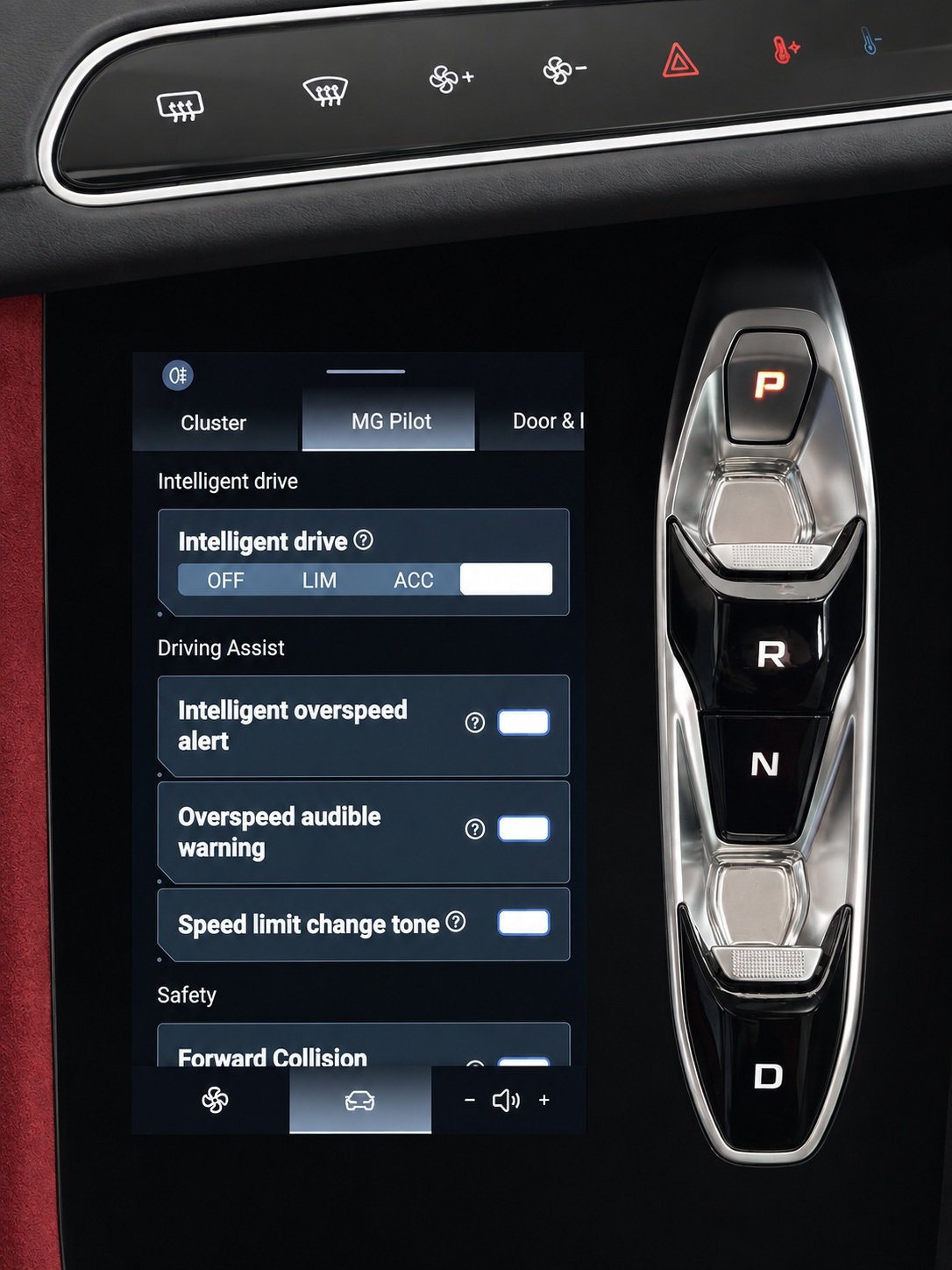
Pressing this key will open the ADAS menu, and from there, you can simply scroll up and down and tap on the buttons of a feature to turn them on or off. This is similar to using an iPhone and turning features on and off. Some features have advanced options too, so if you want to use them, simply tap on the Advanced Settings in their tab, and you will access them. After that, simply toggle them on or off, depending on your own choice.
Our Recommended ADAS Settings for Using the MG Cyberster in Pakistan
These are our suggested settings for everyday driving in Pakistan, based on the intended function of each system. ADAS remains a driver-assistance technology and should not replace driver attention or judgment. System performance can also vary depending on road markings, weather, traffic, and other conditions.
| ADAS Feature / Driver Aid | Our Suggestion |
| Adaptive Cruise Control (ACC) with Stop & Go | |
| Active Emergency Braking (AEB) | Use on Highways but turn off on smaller, city roads |
| Forward Collision Warning (FCW) | Always keep on |
| Lane Keep Assist (LKA) & Departure Warning | Always keep on |
| Emergency Lane Keeping (ELK) | Always keep on |
| Blind Spot Detection (BSD) | Always keep on |
| Rear Cross Traffic Alert (RCTA) | Always keep on |
| Traffic Jam Assist (TJA) | Always keep on |
| Intelligent Speed Limit Assist | Use on highways and major motorways only |
| 360-Degree Surround View Camera | Always helpful, so it must be turned on |
| Front & Rear Parking Sensors | Always on |
| Scissor Door Collision Avoidance Sensors | Always on and particularly helpful in tight city streets |
The MG Cyberster comes with a comprehensive suite of ADAS features designed to assist the driver in different driving situations, from highway cruising and lane keeping to collision warnings and parking. While these systems can make driving safer and more convenient, they remain driver-assistance technologies and should not replace driver attention or judgment. Understanding what each feature does and knowing how to configure it allows Cyberster owners to make better use of the technology while adapting it to the realities of driving in Pakistan.
For additional ADAS Guides, check out the links below:
- Toyota Raize / Daihatsu Rocky (First Generation) ADAS Guide – All Features Across All Trim Levels, How to Use, Turn Off
- Toyota Yaris (Facelift) Active Safety Features Guide – All Features Across All Six Variants
- Deepal S05 ADAS Guide: All Features, How to Use Them, and How to Turn Them Off
- iCAUR V23 ADAS Guide – All Features, How to Use, Turn Off